
ServiceNow is a platform that enables organizations to build applications for managing critical business processes.
As a result, many developers assume that data manipulated by these applications is always kept consistent — just like any standard web application.
However, in real-world development, you may encounter mysterious phenomena such as “calculations that don’t add up” or “data that has disappeared after an update.”
The root cause of many such issues lies in the gap between the ACID properties of ServiceNow’s backend database (MariaDB/InnoDB) and ServiceNow’s own application-layer behavior. In this article, we break down these seemingly complex database concepts using proof-of-concept scripts and diagrams.
| Property (ACID) | Definition & Role |
|---|---|
| Atomicity | “All or Nothing.” Guarantees that all operations within a transaction either all succeed, or none of them are applied — rolling back to a clean state if any step fails. |
| Consistency | Ensures the database satisfies all defined rules (consistency constraints) before and after each transaction. Prevents contradictory or invalid data from being created. |
| Isolation | Guarantees that even when multiple transactions execute concurrently, they do not interfere with each other — behaving as if they were executed sequentially, one at a time. |
| Durability | Once a transaction is committed, its results are permanently persisted and will not be lost even in the event of a subsequent system failure. |
[Proof of Concept] Atomicity
In database theory, Atomicity means that a series of operations will either all be executed (All) or none of them will be executed (Nothing).
However, with standard GlideRecord operations in ServiceNow, this “All or Nothing” behavior can be counter-intuitive.
The following script intentionally succeeds on the first record insert and then forces an error (interrupts processing) on the second insert to verify whether the first record gets rolled back.
(function() {
    var tableName = 'u_record_test';
    var testTag = "ATOMIC_TEST_" + new Date().getTime();

    gs.info("--- [Atomicity Verification] Start ---");

    // 1. First operation within the transaction
    var gr1 = new GlideRecord(tableName);
    gr1.initialize();
    gr1.u_name = "Record 1 (Should be rolled back)";
    gr1.u_test_tag = testTag; // Tag for later lookup
    var id1 = gr1.insert();

    if (id1) {
        gs.info("[Step 1] First insert succeeded. SysID: " + id1);
        gs.info("[Step 1] Appears written to DB at this point, but not yet committed.");
    }

    // 2. Intentional error — abort on second insert
    gs.info("[Step 2] Intentionally causing an error to interrupt the transaction...");

    // setAbortAction(true) signals that this entire transaction should be rolled back
    var gr2 = new GlideRecord(tableName);
    gr2.initialize();
    gr2.u_name = ""; // Assuming an empty value should cause an error
    gr2.setAbortAction(true); // This triggers the "Nothing" side

    var id2 = gr2.insert();

    // 3. Final check: verify whether Record 1 was rolled back
    gs.info("[Step 3] Running final verification...");

    var checkGr = new GlideRecord(tableName);
    checkGr.addQuery('u_test_tag', testTag);
    checkGr.query();

    if (!checkGr.next()) {
        gs.info("======= Verification Result =======");
        gs.info("[PASS] Atomicity is guaranteed!");
        gs.info("Reason: The failure on Step 2 automatically rolled back the successful Step 1 insert.");
        gs.info("===================================");
    } else {
        gs.error("======= Verification Result =======");
        gs.error("[FAIL] Atomicity is NOT maintained. Record 1 still exists in the database.");
        gs.error("===================================");
    }
})();
The log output below shows that in ServiceNow, even when a mid-transaction operation fails, no rollback occurs — the already-inserted record remains in the database.
*** Script: --- [Atomicity Verification] Start ---
*** Script: [Step 1] First insert succeeded. SysID: c717fb333bff3210c09570e0c5e45aa6
*** Script: [Step 1] Appears written to DB at this point, but not yet committed.
*** Script: [Step 2] Intentionally causing an error to interrupt the transaction...
*** Script: [Step 3] Running final verification...
*** Script: ======= Verification Result =======: no thrown error
*** Script: [FAIL] Atomicity is NOT maintained. Record 1 still exists in the database.: no thrown error
*** Script: ===================================: no thrown error
A practical risk to consider: if a parent record’s status is updated but a child record fails mid-process, the child can be left in an inconsistent intermediate state — causing data integrity issues.
Standard SQL Transaction Isolation Levels
MySQL defaults to Repeatable Read.
PostgreSQL defaults to Read Committed.
| Isolation Level | Dirty Read | Non-Repeatable Read | Phantom Read |
|---|---|---|---|
| Read Uncommitted | Possible | Possible | Possible |
| Read Committed | Safe | Possible | Possible |
| Repeatable Read | Safe | Safe | Possible |
| Serializable | Safe | Safe | Safe |
Let’s verify how ServiceNow actually behaves against each of these anomalies.
[Proof of Concept] Consistency
In database theory, Consistency means that no update is ever allowed to violate pre-defined rules (constraints).
However, a common pitfall in ServiceNow development is: “invalid data that the UI correctly prevents can be created with ease via script.”
Suppose you mark a field as Mandatory in ServiceNow’s Table Dictionary. Saving through the form UI will trigger a validation error, preserving consistency.
However, when creating records via a background script, the record is created even if the mandatory field is empty.
(function() {
    var tableName = 'u_record_test'; // Name of the test table you created
    var fieldName = 'u_mandatory_test';   // Name of the field set as Mandatory

    gs.info("--- [Consistency Verification] Start ---");
    gs.info("Target Table: " + tableName);
    gs.info("Mandatory Field: " + fieldName);

    // 1. Intentionally initialize without setting the mandatory field
    var gr = new GlideRecord(tableName);
    gr.initialize();
    gr.u_description = "Consistency Violation Test";
    // gr[u_mandatory_test] = ""; // Deliberately not set

    // 2. Execute insert
    var newSysId = gr.insert();
})();
The record is created with the mandatory field left empty — bypassing the Dictionary constraint entirely.
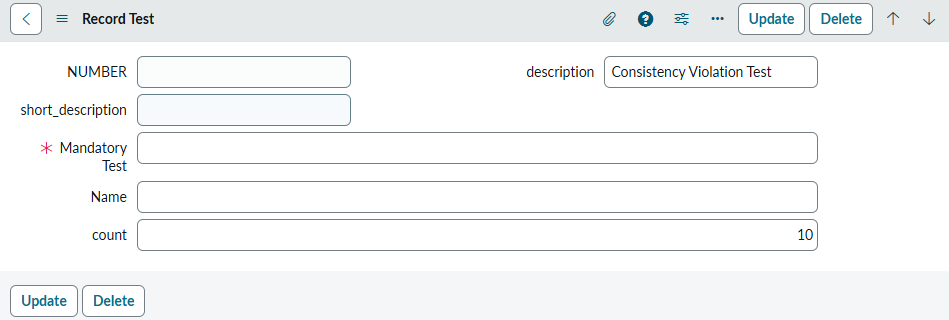
To prevent this, validation checks via Data Policies and Business Rules are essential.
*** Script: --- [Consistency Verification] Start ---
*** Script: Target Table: u_record_test
*** Script: Mandatory Field: u_mandatory_test
Background message, type:error, message: Data Policy Exception:
	The following fields are read only: description
By properly configuring a Data Policy, you can prevent invalid data from being created via script.
[Proof of Concept] Isolation: Non-Repeatable Read
A Non-Repeatable Read occurs within a single transaction when Person A reads a record, Person B modifies and commits that value, and Person A reads the same record again — only to find “the value is different from before!”
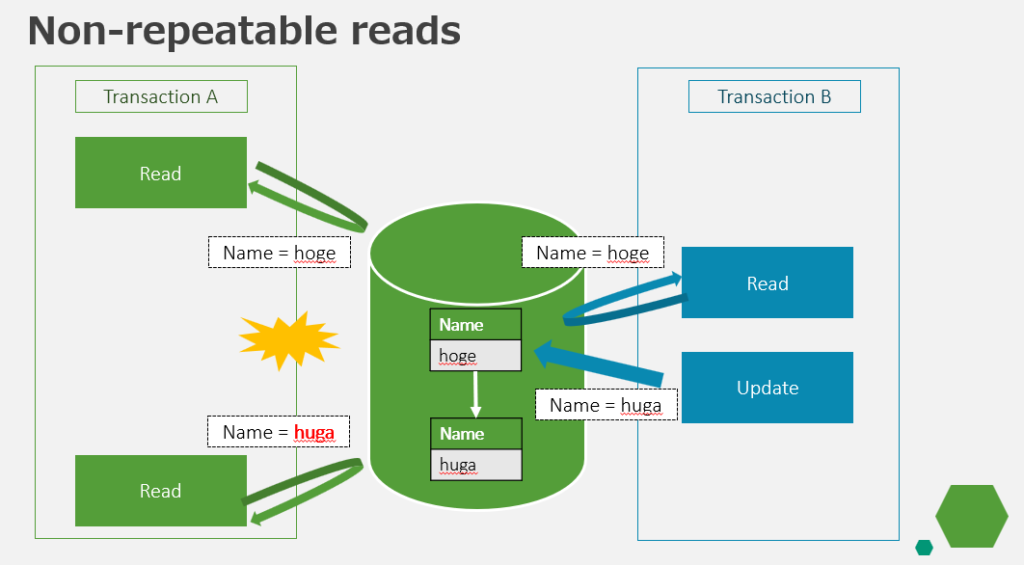
First, Session A reads the record. The value at this point is “hoge”. The script then deliberately enters a 15-second “sleep” to observe database behavior.
(function() {
    var recordSysId = '9ec5a37f3b3f3210c09570e0c5e45aa7'; // Replace with your noted SysID
    var tableName = 'u_record_test';

    gs.info("--- [Session A] Start ---");

    // First read
    var gr1 = new GlideRecord(tableName);
    if (gr1.get(recordSysId)) {
        gs.info("[Session A] 1st Read (Name): " + gr1.u_name); // Expected: hoge
    }

    gs.info("[Session A] Sleeping for 15 seconds. Please update the value to 'huga' in Session B...");
    gs.sleep(15000);

    // Second read (within the same logical context)
    var gr2 = new GlideRecord(tableName);
    if (gr2.get(recordSysId)) {
        var secondReadName = gr2.u_name;
        gs.info("[Session A] 2nd Read (Name): " + secondReadName);

        if (secondReadName == 'hoge') {
            gs.info("[Session A] Result: Value unchanged. Non-Repeatable Read did NOT occur.");
            gs.info("[Session A] This is the power of ServiceNow's Repeatable Read (snapshot isolation).");
        } else {
            gs.warn("[Session A] Result: Value changed to 'huga'! Non-Repeatable Read HAS OCCURRED.");
        }
    }

    gs.info("--- [Session A] End ---");
})();
While Session A is sleeping, a separate session (Session B) updates the same record. The value is overwritten to “huga” and immediately committed.
(function() {
    var recordSysId = '9ec5a37f3b3f3210c09570e0c5e45aa7'; // Same SysID as Session A
    var tableName = 'u_record_test';

    gs.info("--- [Session B] Updating value to 'huga' ---");

    var gr = new GlideRecord(tableName);
    if (gr.get(recordSysId)) {
        gr.u_name = "huga";
        var success = gr.update();

        if (success) {
            gs.info("[Session B] Update successful! 'huga' has been committed.");
            gs.info("[Session B] Go back to Session A and check the result.");
        }
    } else {
        gs.error("[Session B] Record not found.");
    }
})();
Checking the result confirms that the read value has changed — a Non-Repeatable Read has occurred.
*** Script: --- [Session A] Start ---
*** Script: [Session A] 1st Read (Name): hoge
*** Script: [Session A] Sleeping for 15 seconds. Please update the value to 'huga' in Session B...
*** Script: [Session A] 2nd Read (Name): huga
*** Script: [Session A] Result: Value changed to 'huga'! Non-Repeatable Read HAS OCCURRED.
*** Script: --- [Session A] End ---
[Proof of Concept] Isolation: Phantom Read
A Phantom Read occurs within a single transaction when the same query is executed twice, and a “new record” that did not exist in the first result appears in the second — like a ghost materializing out of nowhere.
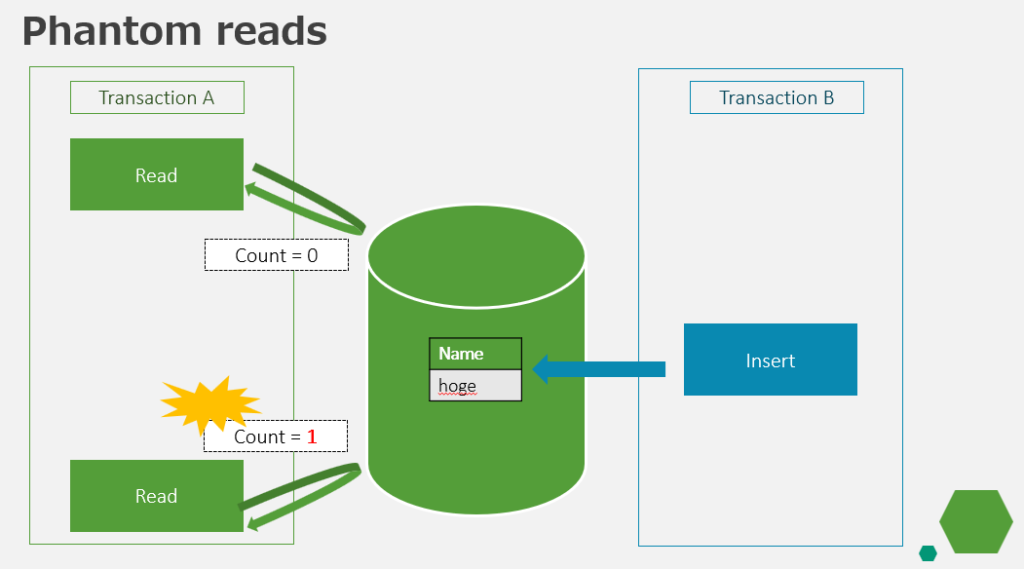
In this test, we start with 0 records whose u_name starts with Phantom. While Session A confirms “0 results” and sleeps, Session B inserts one “ghost” record.
(function() {
    var tableName = 'u_record_test';
    var queryString = 'u_nameSTARTSWITHPhantom';

    gs.info("--- [Session A] Phantom Read Test Start ---");

    // First query: snapshot the result set at this moment
    var gr1 = new GlideRecord(tableName);
    gr1.addEncodedQuery(queryString);
    gr1.query();
    var count1 = gr1.getRowCount();
    gs.info("[Session A] 1st Query Result: " + count1 + " row(s)");

    gs.info("[Session A] Waiting 15 seconds... Please insert a new record in Session B during this time.");
    gs.sleep(15000);

    // Second query: re-run within the same logical context
    var gr2 = new GlideRecord(tableName);
    gr2.addEncodedQuery(queryString);
    gr2.query();
    var count2 = gr2.getRowCount();

    gs.info("[Session A] 2nd Query Result: " + count2 + " row(s)");

    if (count1 === count2) {
        gs.info("[Session A] Verdict: No change in count. Phantom Read was prevented.");
        gs.info("[Session A] Cause: REPEATABLE READ-level 'Next-Key Lock' or 'MVCC' is functioning.");
    } else {
        gs.warn("[Session A] Verdict: Row count increased! Phantom Read HAS OCCURRED.");
    }

    gs.info("--- [Session A] End ---");
})();
(function() {
var tableName = 'u_record_test';
gs.info("--- [Session B] Inserting ghost record ---");
var gr = new GlideRecord(tableName);
gr.initialize();
gr.u_name = "Phantom_New_Record_" + new Date().getTime();
var newSysId = gr.insert();
if (newSysId) {
gs.info("[Session B] Insert complete. Committed to DB. SysID: " + newSysId);
}
gs.info("--- [Session B] End ---");
})();The result confirms that the record inserted by Session B during the wait was picked up by Session A’s second query — a Phantom Read has occurred.
*** Script: --- [Session A] Phantom Read Test Start ---
*** Script: [Session A] 1st Query Result: 0 row(s)
*** Script: [Session A] Waiting 15 seconds... Please insert a new record in Session B during this time.
*** Script: [Session A] 2nd Query Result: 1 row(s)
*** Script: [Session A] Verdict: Row count increased! Phantom Read HAS OCCURRED.
*** Script: --- [Session A] End ---
[Proof of Concept] Isolation: Dirty Read
A Dirty Read occurs when one transaction reads uncommitted “in-flight” data that another transaction is in the middle of modifying — data that has not yet been committed.
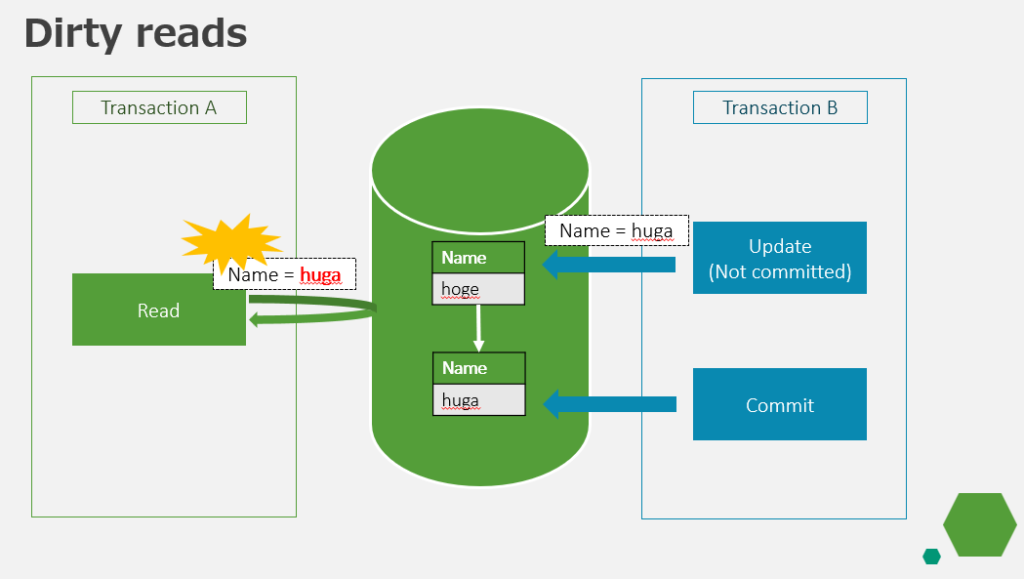
If a Dirty Read occurs, your logic acts on data that has never officially been committed — creating a serious risk of data inconsistency.
We verified via script whether Session A can read the value that Session B has set before calling update(). In this case, no Dirty Read occurred.
(function() {
    var recordSysId = '9ec5a37f3b3f3210c09570e0c5e45aa7';
    gs.info("--- [Session A] Dirty Read Test Start ---");

    var gr1 = new GlideRecord('u_record_test');
    if (gr1.get(recordSysId)) {
        gs.info("[Session A] Initial value: " + gr1.u_name); // Expected: hoge
    }

    gs.info("[Session A] Waiting 15 seconds. Session B will modify the value without calling update()...");
    gs.sleep(15000);

    var gr2 = new GlideRecord('u_record_test');
    if (gr2.get(recordSysId)) {
        gs.info("[Session A] Value after wait: " + gr2.u_name);
    }

    gs.info("--- [Session A] End ---");
})();
Session B only sets the value in memory — it does not call update(), so no commit occurs.
(function() {
    var recordSysId = '9ec5a37f3b3f3210c09570e0c5e45aa7';
    var gr = new GlideRecord('u_record_test');

    if (gr.get(recordSysId)) {
        gr.u_name = "DIRTY_DATA";
        // Simulating a heavy operation right before calling update()
        gs.info("[Session B] Value set to 'DIRTY_DATA' in memory. Not yet committed.");

        gs.sleep(20000); // During this time, the change exists in memory but is not in DB

        // gr.update(); // Commented out — intentionally not committing
        gs.info("[Session B] End (exiting without commit, or with delayed commit)");
    }
})();
The log confirms that Session A reads the pre-update value “hoge” — the uncommitted dirty data is not visible.
*** Script: --- [Session A] Dirty Read Test Start ---
*** Script: [Session A] Initial value: hoge
*** Script: [Session A] Waiting 15 seconds. Session B will modify the value without calling update()...
*** Script: [Session A] Value after wait: hoge
*** Script: --- [Session A] End ---
Summary: ACID Verification Results in ServiceNow
The table below summarizes the ACID support status for standard GlideRecord operations in ServiceNow, as revealed by our verification tests.
| Property | Result | Observed Behavior & Notes | Best Practice |
|---|---|---|---|
| Atomicity | Not Guaranteed | If an error occurs while updating multiple records, already-updated records are NOT rolled back automatically. | Design with explicit error handling — never assume a rollback will occur. |
| Consistency | Not Guaranteed | Script-based inserts can easily bypass Dictionary-level Mandatory field constraints. | Layer Business Rules and Data Policies to enforce logical consistency. |
| Isolation | Incomplete | Phantom Reads and Non-Repeatable Reads have been confirmed to occur. | Implement optimistic locking or event-queue serialization for critical workflows. |
| Durability | Platform Guaranteed | Committed data is protected by redundant storage and backups — preserved even in the event of a failure. | This is handled by the ServiceNow platform. No developer action required. |
ServiceNow is an incredibly flexible platform.
However, the very ease with which you can build applications also comes with constraints and trade-offs that must not be overlooked.
As ServiceNow developers, we must constantly face these limitations head-on — designing with careful consideration of business process characteristics, data criticality, and the various constraints the platform imposes.
I hope this article helps you prevent unexpected data issues in your ServiceNow implementations.

質問・コメント